




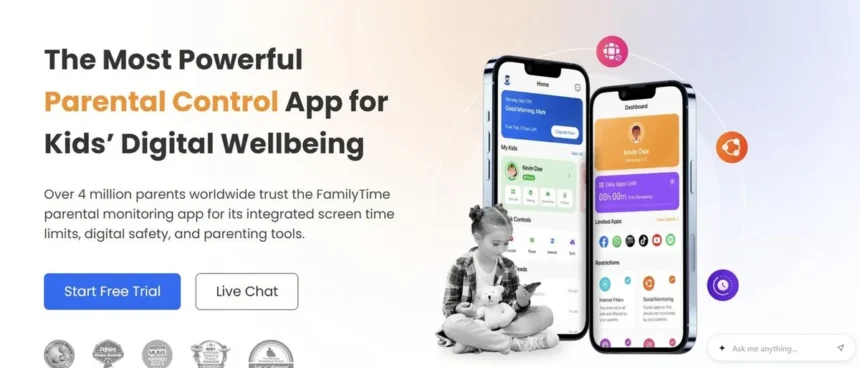
FamilyTime Premium emerges as a budget-friendly yet comprehensive parental control application, offering robust features for monitoring children’s digital activities. With pricing starting at an accessible $2.41 per month for a single device, the software provides various cost-effective plans for multiple devices. A key differentiator is its semi-consensual approach, featuring a transparent app for the child’s device that allows them to view their screen time allowances. The platform also boasts strong location tracking, geofencing capabilities, screen time management tools, and controls over app and website access for parents.
FamilyTime Premium: Plans and Pricing
FamilyTime Premium presents a clear pricing structure with three distinct plans: My Family, My Family 3, and My Family 5. These plans cater to the needs of single-device users, as well as families requiring coverage for three or five devices, respectively. The cost for a single device is $2.41 per month, billed annually at $29. For three devices, the price is $4.08 per month, with an annual bill of $49. The five-device plan costs $5.75 per month, billed annually at $69. Importantly, all plans offer the full suite of FamilyTime Premium features; the only variation is the number of devices supported. This ensures that even the most basic plan provides access to the software’s complete functionality.
Prospective users can take advantage of a 3-day free trial to explore the software’s capabilities before committing to a subscription. However, it’s important to note that this trial period has limitations, particularly concerning social media monitoring on platforms like WhatsApp, Instagram, TikTok, Twitch, and Signal. Access to features such as reading text messages or viewing call logs is also restricted during the trial. Despite these limitations, the trial offers a valuable opportunity to test the core features and determine if FamilyTime is the right fit for your family’s needs.
Key Features of FamilyTime Premium
FamilyTime Premium is equipped with a wide array of features designed to give parents granular control over their children’s device usage and online safety. The Balance feature allows parents to set daily screen time limits and individual app usage limits, providing precise control over how much time children spend on their devices. Complementing this is the Screen Schedule function, which enables parents to define specific times of day when screen access is permitted. The Scheduled Internet feature offers further control by allowing parents to block internet access for set periods, while still permitting the use of non-internet-dependent applications.
A standout feature is the Time Bank, which allows children to accumulate unused screen time from previous days, offering flexibility in managing their digital allowances. In urgent situations, the Family Pause feature can instantly lock a child’s device. Beyond screen time management, FamilyTime provides essential safety tools. Parents can block specific applications or games they deem inappropriate and restrict access to age-sensitive websites. Conversely, they can create whitelists of approved apps and games and enable search filters to block explicit content.
For emergencies, the SOS Panic Button allows children to send an immediate alert to parents, signaling that they require assistance. The PickMeUp Request feature provides real-time reminders, facilitating easier coordination for pickups. FamilyTime also offers comprehensive visibility into a child’s phone activity. Parents can view contact lists, text messages, call logs, installed applications, and web browsing history. Social media activity on platforms like WhatsApp, Instagram, TikTok, Twitch, and Signal can also be monitored. Furthermore, the software includes robust location tracking and geofencing capabilities, allowing parents to view their family members on a live map and receive alerts when children enter or leave predefined geographical areas.
User Interface and Installation
FamilyTime operates on both Android and iOS platforms. Unlike some competitors that offer remote installation via iCloud credentials, FamilyTime requires physical access to the child’s device for installing the FamilyTime Junior app. The parent installs the FamilyTime Dashboard app on their own device, and the two are then linked by scanning a QR code. On Android devices, parents must grant specific permissions, including overlay access, device administrator rights, and enable installations from unknown sources, to ensure all features function correctly. A four-digit PIN is set during installation to prevent the child from uninstalling or disabling the FamilyTime Junior app.
A significant advantage of FamilyTime is its transparency for children. The Junior app allows them to view their remaining screen time, send SOS alerts, check their Time Bank balance, and see which applications are blocked. The parent dashboard is designed to be intuitive and user-friendly, with a clean layout that facilitates easy navigation through its various features. The setup tutorial is detailed, and the overall installation process is generally quick, taking only a few minutes. While occasional performance inconsistencies might arise, particularly on iOS due to its more restricted ecosystem, both applications typically function smoothly without a steep learning curve.
Customer Support
FamilyTime provides commendable customer support. Prior to purchasing a plan, users can access 24/7 live chat support via the website to address any questions or concerns. This accessibility is a notable advantage compared to some services that may not offer live chat before a subscription is finalized. Once subscribed, users gain access to 24/7 Premium in-app live chat and 24/7 email support, which should adequately cover most user needs. Additionally, the platform offers an extensive library of how-to articles and FAQs, providing solutions to common queries. Detailed step-by-step installation guides and walkthroughs for core functionalities are also readily available, further assisting users in navigating the software.
Competitive Landscape
When compared to other parental control solutions, FamilyTime stands out for its affordability and transparency. Competitors like mSpy offer more advanced features such as keylogging and keyword alerts, along with broader social media monitoring capabilities, including AI chatbot interactions. However, mSpy comes at a significantly higher price point, starting at $11.67 per month per device on an annual plan, which can become prohibitively expensive for families with multiple children. mSpy also operates with a more closed monitoring environment.
Qustodio is another robust alternative, providing traditional parental control features like screen time limits, app and website blocking, location tracking, and social media monitoring across a wide range of platforms including Windows, Mac, Android, iOS, Chromebook, and Kindle. For families seeking an approach that emphasizes safety over surveillance, options like Bark or HeyPolo are worth considering. Bark, for instance, uses an AI alert system to flag potential risks like predators, cyberbullying, or self-harm, rather than providing parents with exhaustive logs of their children’s communications. These alternatives focus on proactive risk detection and open communication about online safety.
Conclusion
FamilyTime Premium is a highly recommended parental control application, particularly for families seeking an effective solution that doesn’t break the bank. Its competitive pricing, with plans starting at just $2.41 per month, makes it one of the most accessible options on the market. The transparent Junior app, allowing children to view their own usage limits and alerts, fosters a sense of trust and shared responsibility. Features such as 30-day activity reports, comprehensive location tracking and geofencing, and social media monitoring, combined with a free trial that includes most features, offer significant value. While it may lack certain advanced functionalities like keylogging or extensive keyword alerts found in pricier alternatives, FamilyTime Premium provides a well-rounded and user-friendly experience for essential parental monitoring needs.










%20122025%20Top%20Art%20SOURCE%20Chronicle%20Books_Tra%20Publishing.jpg "The Finest Cookbooks of 2025: Soju Social gathering, Fats and Flour, Salsa Daddy, Italo Punk, and Extra")