By using this site, you agree to the Privacy Policy and Terms of Use.
Accept
MadisonyMadisony
Notification Show More
Font ResizerAa
  • Home
  • National & World
  • Politics
  • Investigative Reports
  • Education
  • Health
  • Entertainment
  • Technology
  • Sports
  • Money
  • Pets & Animals
Reading: Enable Hypertension Alerts on Apple Watch: Full Guide
Share
Font ResizerAa
MadisonyMadisony
Search
  • Home
  • National & World
  • Politics
  • Investigative Reports
  • Education
  • Health
  • Entertainment
  • Technology
  • Sports
  • Money
  • Pets & Animals
Have an existing account? Sign In
Follow US
2025 © Madisony.com. All Rights Reserved.
businessEducationEntertainmentHealthPoliticsSportsTechnologytopworld

Enable Hypertension Alerts on Apple Watch: Full Guide

Madisony
Last updated: January 31, 2026 5:04 pm
Madisony
Share
Enable Hypertension Alerts on Apple Watch: Full Guide
SHARE

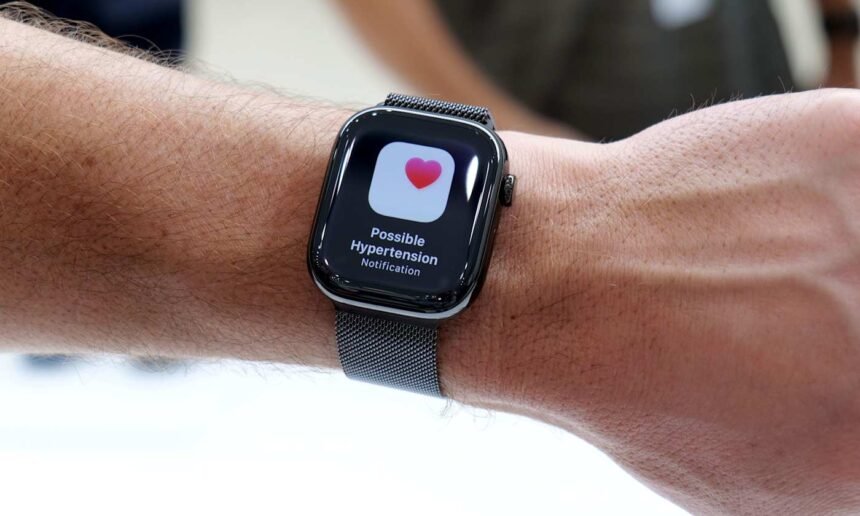
Apple continues to enhance the Apple Watch’s health capabilities, extending from basic fitness monitoring to tools that flag potential health issues early. A notable update includes hypertension alerts, which notify users of prolonged elevated blood pressure patterns. Although the device does not measure blood pressure directly, it identifies trends that warrant medical consultation. This guide covers the purpose of these alerts, their operation, and steps to activate and oversee them.

Contents
What Hypertension Alerts AccomplishEligibility for Hypertension AlertsSteps to Activate Hypertension AlertsHandling Notifications and AlertsBenefits of Hypertension AlertsResponding to an AlertKey Limitations

What Hypertension Alerts Accomplish

These alerts detect ongoing patterns that signal possible high blood pressure. The Apple Watch processes 30 days of data, such as heart rate, activity levels, and other metrics from the Health app. It identifies persistent shifts matching hypertension indicators. Upon spotting such a trend, the watch delivers a notification. These serve as prompts for further checks, not diagnoses, and target individuals without prior high blood pressure diagnoses to boost awareness.

Eligibility for Hypertension Alerts

Users need an Apple Watch Series 9 or newer, or Apple Watch Ultra 2 or later, connected to an iPhone 11 or subsequent model. The feature demands current watchOS and iOS versions for its algorithms. Participants must be at least 22 years old, non-pregnant, and free of hypertension diagnoses. Enable Wrist Detection on the watch, and update personal details like age, sex, height, and weight in the Health app. Consistent wear, especially during sleep, ensures adequate data for trends; alerts emerge after sufficient monitoring, not instantly.

Steps to Activate Hypertension Alerts

Control the feature via the Health app on the linked iPhone, not the watch. The app verifies no prior hypertension diagnosis and reviews health info for precision. Launch the Health app, tap the profile icon in the upper corner, then choose Health Checklist under Features. Select Hypertension Notifications, verify age and diagnosis status, then proceed through explanations and prompts. Finish by tapping Done; the system operates in the background without daily input.

Handling Notifications and Alerts

Enabled alerts notify via the Apple Watch and iPhone, describing the detected trend and suggesting actions. Customize delivery through Health app settings, opting for lock screen, Notification Center, or time-sensitive watch alerts. Access related data and educational content in the Health app anytime, though no exact blood pressure figures appear.

Benefits of Hypertension Alerts

High blood pressure often progresses silently without early symptoms, evading detection until routine exams. Alerts highlight subtle shifts, encouraging timely doctor visits, home monitoring, or lifestyle tweaks like better diet, exercise, or sleep. They provide context via existing watch tracking of activity and rest.

Responding to an Alert

An alert signals no emergency but urges cardiovascular focus. Measure blood pressure with a cuff at home or consult a doctor for accurate assessment and advice. Evaluate factors like exercise, sleep, stress, and nutrition; the Apple Watch tracks several to inform discussions with providers.

Key Limitations

Availability varies by region due to regulations. Reliable alerts require steady watch use for data accumulation. Remember, the device infers trends from correlations, not direct measurements, so it complements, not replaces, professional medical tools and care.


Subscribe to Our Newsletter
Subscribe to our newsletter to get our newest articles instantly!
[mc4wp_form]
Share This Article
Email Copy Link Print
Previous Article DWP Extends PIP Awards to 3-5 Years from April 2026 DWP Extends PIP Awards to 3-5 Years from April 2026
Next Article Harry Brook’s Captaincy Questioned After Nightclub Incident Cover-Up Harry Brook’s Captaincy Questioned After Nightclub Incident Cover-Up

POPULAR

Top Fund Managers Reveal Six Undervalued Stocks Set to Soar
business

Top Fund Managers Reveal Six Undervalued Stocks Set to Soar

Pancreatic Cancer Survivor Shares Life-Saving Insights
world

Pancreatic Cancer Survivor Shares Life-Saving Insights

Kellie Finlayson Opts for Celebration Over Funeral Amid Cancer Battle
Sports

Kellie Finlayson Opts for Celebration Over Funeral Amid Cancer Battle

Métis Film ‘Blood Lines’ Celebrates Culture, Language
top

Métis Film ‘Blood Lines’ Celebrates Culture, Language

Arsenal Readies Second Bid for Newcastle Star Bruno Guimaraes
Sports

Arsenal Readies Second Bid for Newcastle Star Bruno Guimaraes

Prediction Market Polymarket Suffers Cyberattack, User Funds Compromised
Technology

Prediction Market Polymarket Suffers Cyberattack, User Funds Compromised

Iran Accused of Ceasefire Violation Amid Strait of Hormuz Tensions
Politics

Iran Accused of Ceasefire Violation Amid Strait of Hormuz Tensions

You Might Also Like

Reddit Unlocks Video Comments for Enhanced Community Interaction
Technology

Reddit Unlocks Video Comments for Enhanced Community Interaction

Reddit has introduced a significant new feature, allowing users to post videos directly within comment threads. This expansion builds upon…

2 Min Read
The Greatest Ergonomic Mouse (2025), Examined and Reviewed
Technology

The Greatest Ergonomic Mouse (2025), Examined and Reviewed

Different Ergonomic Mice to Take into accountThere are a number of extra choices available on the market to contemplate. These…

8 Min Read
Progressive Overtakes State Farm as Top US Auto Insurer for First Time Since WWII
business

Progressive Overtakes State Farm as Top US Auto Insurer for First Time Since WWII

In a historic shift for the U.S. auto insurance industry, Progressive has surpassed State Farm to become the nation’s largest…

2 Min Read
DraftKings Sportsbook Promo for NFL Week 2: Wager , Get 0 Immediately on Any NFL Sunday Matchup
Sports

DraftKings Sportsbook Promo for NFL Week 2: Wager $5, Get $200 Immediately on Any NFL Sunday Matchup

This page may contain affiliate links to legal sports betting partners. If you sign up or place a wager, FOX…

5 Min Read
Madisony

We cover the stories that shape the world, from breaking global headlines to the insights behind them. Our mission is simple: deliver news you can rely on, fast and fact-checked.

Recent News

Top Fund Managers Reveal Six Undervalued Stocks Set to Soar
June 27, 2026
Pancreatic Cancer Survivor Shares Life-Saving Insights
June 27, 2026
Kellie Finlayson Opts for Celebration Over Funeral Amid Cancer Battle
June 27, 2026

Trending News

Top Fund Managers Reveal Six Undervalued Stocks Set to Soar
Pancreatic Cancer Survivor Shares Life-Saving Insights
Kellie Finlayson Opts for Celebration Over Funeral Amid Cancer Battle
Métis Film ‘Blood Lines’ Celebrates Culture, Language
Arsenal Readies Second Bid for Newcastle Star Bruno Guimaraes
  • About Us
  • Privacy Policy
  • Terms Of Service
Reading: Enable Hypertension Alerts on Apple Watch: Full Guide
Share

2025 © Madisony.com. All Rights Reserved.

Welcome Back!

Sign in to your account

Username or Email Address
Password

Lost your password?