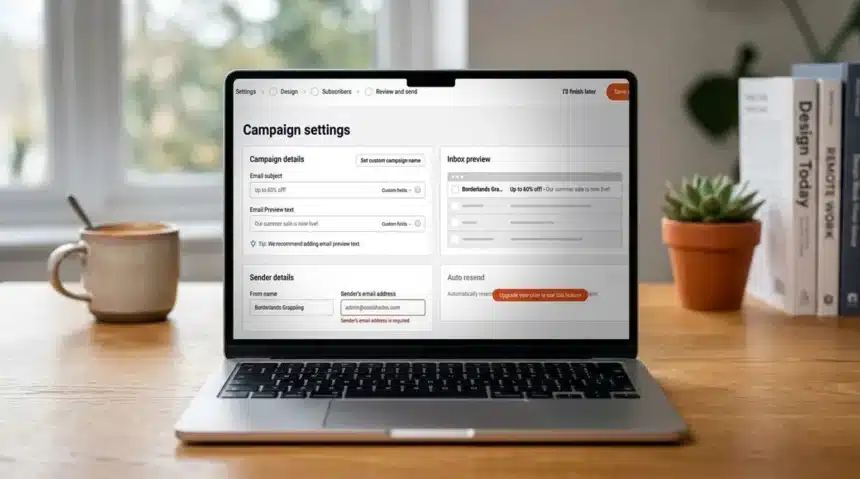
Sender offers substantial value for small businesses and independent creators seeking effective email automation at minimal cost. Its free plan stands out as one of the most generous options, though the platform reveals limitations in advanced design and large-scale segmentation.
Pros and Cons
- Pros: Generous free forever plan; 24/7 live chat support; Visual automation builder included
- Cons: Templates appear dated and limited; No built-in CRM; Free plan displays Sender branding
Sender has established itself as an affordable email marketing solution since 2012, serving over 180,000 businesses. It integrates newsletters, automation workflows, transactional emails, and SMS into a single platform, unlike many rivals that segment these across pricier tiers.
Hands-on testing of Sender’s automation, template, and form-building tools, combined with official documentation and user feedback, informs this evaluation.
Hands-On Experience
Account creation requires just two minutes and no credit card, delivering a seamless start. The dashboard proves intuitive, allowing immediate campaign launches without tutorials. Users transitioning from costlier platforms like Mailchimp appreciate the low entry barrier and affordability.
Sender excels with straightforward campaigns. Its drag-and-drop builder operates quickly and reliably for basic newsletters, welcome series, or cart abandonment flows, though it lacks the sophisticated controls of Klaviyo or ActiveCampaign.
Key Features
Sender provides a comprehensive email marketing suite, including a drag-and-drop builder, pre-built templates, visual automation, subscriber segmentation, signup forms, and popups like spin-to-win and exit-intent. Transactional emails come standard across all plans, a rarity among competitors.
The visual automation builder shines, enabling multi-step workflows with triggers such as link clicks or cart abandonment, blending email and SMS. Ready-made templates accelerate setup for welcome and re-engagement campaigns.
However, templates lean basic, hindering brand-focused efforts. Without native CRM, integrations like Zapier become essential for data sync. Core deliverability tools like SPF/DKIM and double opt-in exist, but no specialized dashboard aids troubleshooting.
User Experience
The simple interface suits most users, enabling rapid campaign creation via drag-and-drop without design expertise. Many report sending initial campaigns within minutes.
Challenges arise with large lists or detailed segments, which demand extra steps. Interface languages limit to English, Lithuanian, Polish, and Spanish, potentially affecting global teams. Still, it remains user-friendly for small operations.
Customer Support
Sender differentiates with 24/7 live chat, boasting second-fast response times praised across G2, Capterra, and Trustpilot. Free users access the same support as paid ones. Additional options include a help center and email.
Pricing Plans
| Plan | Price (monthly) | Subscribers | Notes |
|---|---|---|---|
| Free | $0 | 2,500 | 15,000 emails/month; Sender branding on emails/forms |
| Standard | From $10 | 1,000 to 200,000 | Removes branding; Adds SMS credits, multi-user access |
| Professional | From $20 | 1,000 to 200,000 | Dedicated IP, animated timers, ecommerce reporting, free SMS credits |
| Enterprise | Custom | Custom | Unlimited sends, success manager, advanced permissions |
The free plan supports genuine operations with 2,500 subscribers and 15,000 emails monthly, sans expiration. Branding vanishes on paid tiers. Standard and Professional scale similarly, avoiding steep jumps. Professional adds value via dedicated IP and ecommerce metrics. Annual discounts drop Standard to $7/month and Professional to $14/month (excl. VAT).
Key Specifications
| Spec | Details |
|---|---|
| Free plan | 2,500 subscribers; 15,000 emails/month |
| Automation | Visual builder with behavioral triggers |
| SMS | Available on all plans; credits on Standard+ |
| Integrations | WordPress, WooCommerce, Shopify, Zapier |
| Support | 24/7 live chat, help center, email |
Performance Ratings
| Attribute | Notes | Score |
|---|---|---|
| Features | Solid core; limited for complex campaigns | 3.5/5 |
| Performance | Good deliverability; no dedicated dashboard | 3.5/5 |
| Design | Clean interface; dated templates | 3.5/5 |
| Value | Generous free plan | 4.5/5 |
Who Should Choose Sender?
Buy if:
- You seek a perpetual free plan: Supports 2,500 subscribers/15,000 emails, surpassing Mailchimp or Brevo equivalents.
- Straightforward workflows suffice: Handles automations like welcomes and cart recovery easily.
- Support is priority: 24/7 chat available universally, outperforming peers.
Avoid if:
- Design-intensive campaigns needed: Limited templates and editor.
- CRM integration central: Requires Zapier for alignment.
- Scaling rapidly: Constraints emerge in advanced automations.
Alternatives
- Mailchimp: Expansive integrations, advanced segmentation; pricier for growth.
- Brevo: Native CRM, robust transactional emails.
- Omnisend: Ecommerce-focused with Shopify/WooCommerce workflows.
Testing Methodology
Testing encompassed free account setup, campaign building across newsletters, automations, and transactional emails. Evaluated segmentation, forms, and popups for small business scenarios. Verified pricing and features against official sources, incorporating user reviews for support and usability insights.