

VistaPrint AI Logo Maker: Overview
VistaPrint’s AI logo maker ranks among the leading tools in its category, delivering exceptional ease of use for individuals with limited design expertise. Outputs prove consistently effective, though some prompts occasionally fail to yield exact results, which can exhaust credits faster than expected. Small business owners with a clear vision and precise descriptions find it a rapid, engaging solution for generating professional-grade logos.
Pros
- Completely free to start
- Intuitive for beginners
- Lightning-fast AI generation
- Custom designs reflecting business specifics and styles
Cons
- AI occasionally ignores detailed requests
- Credits vanish quickly without careful prompting
Pricing and Plans
The core AI logo maker operates at no cost, providing four initial logo generations. Creating a VistaPrint account boosts this to 64 free credits. Expenses arise from add-ons, such as professional designer revisions, printing on items like business cards or mugs, or integration with the VistaPrint website builder.
A VistaCreate subscription costs $10 monthly, granting 100 AI credits, unlimited storage, and design templates.
Interface and Setup
The platform features a streamlined, minimalist design that avoids overwhelming new users. Start by entering a business name in a simple text field and proceed. A progress bar reassures users throughout the three-step process: adding a tagline and business details, selecting up to four preferred styles from minimalist to vibrant, and describing ideal elements like colors, icons, or imagery.
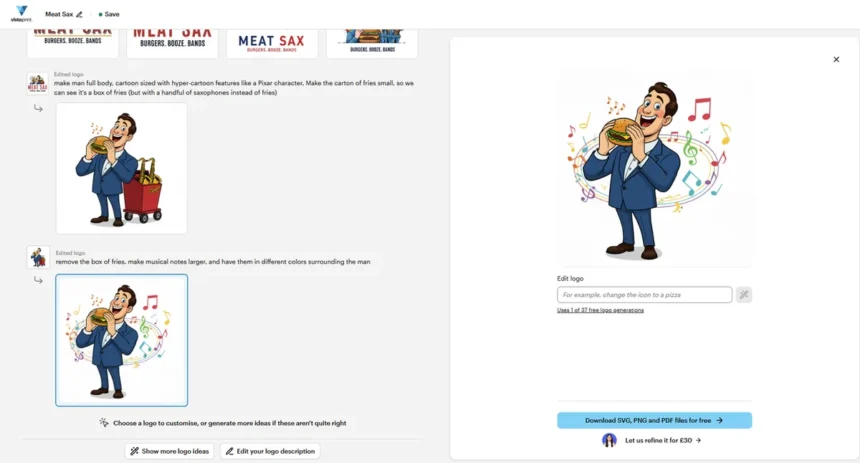
Specific prompts yield better outcomes—detailed inputs outperform vague ones. Completion reveals four logo options, with choices to generate more, refine descriptions, or edit selections, each consuming a credit.
Performance in Practice
Testing confirms the tool’s simplicity via text prompts. Attempts to mimic established brand logos triggered blocks on trademarked names, such as major tech firms or fast-food giants, ensuring compliance. Fictional brands succeeded seamlessly.
For a cozy cafe, “Cosy Beans coffee & book shop,” prompts for a friendly anthropomorphic coffee bean produced charming, versatile designs suitable for marketing.
“Stevie C’s House of DJ” yielded energetic, colorful logos capturing a party vibe.
A burger spot, “Meat Sax – Burgers. Booze. Bands,” requested a cartoon figure and saxophone-filled fries container. While specific elements like gradients or outlines resisted changes, core adjustments to fonts, colors (via hex codes), and imagery worked swiftly, typically in 5-10 seconds. Unsuccessful edits still deduct credits, emphasizing the need for upfront precision.
Occasional glitches included persistent gradients, unchanged outlines, or unintended alterations like new taglines, but most results impressed for quick branding needs.
Export and Management
Downloading finalized logos is effortless: select SVG, PNG, or PDF for a free ZIP file. The account dashboard stores all projects, prompts, brand kits, colors, and printing options, ideal for team collaboration.
Usage Rights
Businesses can fully utilize AI-generated logos for marketing and social media. Patrick Llewellyn, Vice President of Digital and Design Services at VistaPrint, explains: “The AI generates designs based on a unique combination of a business name, industry, and style preferences, ensuring high variety and distinction. Users have full rights to their finalized logo for business purposes. However, no intellectual property rights transfer, preventing trademark or copyright registration—standard for AI imagery.”
Final Verdict
This free tool excels for non-designers seeking fast, attractive logos. Refinements demand careful prompting to conserve credits, but 64 allocations suffice for most. It suits small businesses prioritizing speed over bespoke perfection.
Ideal For
- Non-designers needing quick, AI-driven branding
- Users planning print integration for promo materials
Not For
- Professional designers preferring full control
- Those requiring trademarkable IP ownership