

Don’t relegate that aging Android tablet to the junk drawer just yet. A clever application called Open Headunit offers a compelling way to transform an old tablet into a fully functional Android Auto display for your vehicle, providing a modern infotainment experience even in cars without built-in support.
Giving Old Tablets New Life as Android Auto Displays
Many older Android tablets, once unable to run the latest apps, find themselves relegated to niche uses like e-readers or smart home controllers. However, the Open Headunit app presents an unexpected and valuable alternative: repurposing the tablet as a dedicated head unit for Android Auto. This allows you to leverage the tablet’s larger screen for navigation, media playback, and managing phone calls and messages in a car-friendly interface.
The Open Headunit app, available for a nominal fee on the Google Play Store or as a free download from GitHub for those comfortable with a bit more technical setup, effectively tricks your smartphone into recognizing the tablet as an Android Auto-compatible car display. This can be a significant upgrade, especially for drivers of older vehicles that lack integrated infotainment systems or for those whose car manufacturers are discontinuing support for their built-in systems.
How Open Headunit Transforms Your Driving Experience
Android Auto is designed to seamlessly connect your smartphone to your car’s display, offering a simplified and safer interface for essential driving functions. While a welcome feature for many, its absence in older or less equipped vehicles means many drivers miss out on this convenience. By using a tablet with Open Headunit, you can bridge this gap. Instead of relying solely on Bluetooth for basic audio and calls, you can achieve a much richer and more integrated experience, akin to a factory-installed system.
Setting Up Open Headunit
Getting Open Headunit operational involves some initial configuration, but the app aims to simplify the process. It supports various connection methods, including USB, Wi-Fi, and Bluetooth, and can even run Android Auto directly on the tablet if the device has the capability. The key is to experiment to find the most stable and efficient connection for your specific hardware combination.
Crucially, to enjoy audio playback through your car’s speakers, you’ll need to connect the tablet to your vehicle’s audio system. Open Headunit includes a configuration tool designed to guide users through the essential settings, helping to optimize the setup for individual hardware.
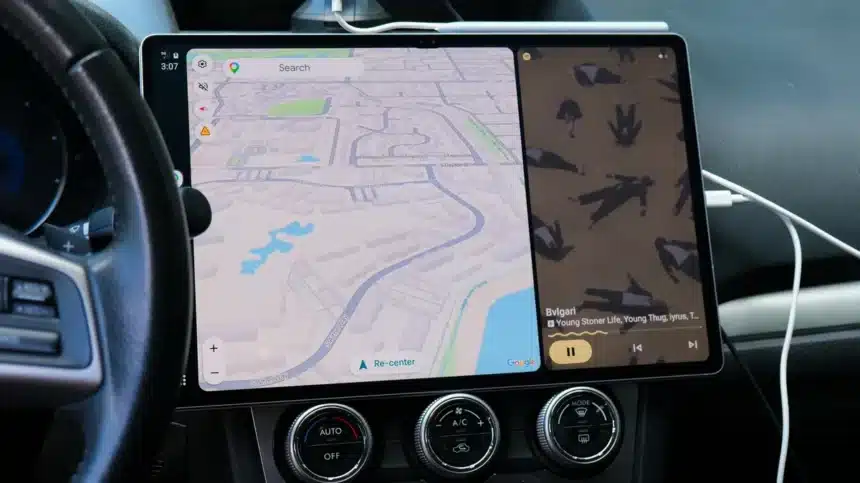
One user’s experience highlighted the potential complexities and solutions. While wireless connections sometimes proved problematic, a USB connection emerged as the most reliable method. After granting the necessary permissions to Open Headunit and setting it as the default for USB connections, plugging a phone into a Samsung Galaxy Tab S10 Ultra consistently launched Android Auto and resumed media playback. Audio routing through the car’s Bluetooth initially introduced latency, but this was mitigated by using a USB-C hub with a 3.5mm jack and an auxiliary cable connected to the car’s audio input.
It’s important to note that performance can vary based on the tablet’s age and capabilities. While the app performed admirably on a relatively modern, high-end tablet, attempts to revive much older devices, such as a 2013 Nexus 7 and a 2019 Galaxy Tab S6 Lite, were unsuccessful due to hardware failures. However, the processing load is primarily handled by the connected smartphone, with the tablet acting as the display interface.
Considerations and Potential Drawbacks
While Open Headunit offers a cost-effective solution, it’s not without its considerations. The visibility of a tablet mounted in a car could make it a target for theft, even if it’s an older model. To mitigate this, users might consider temporary mounting solutions, such as using multiple MagSafe mounts or readily available car tablet mounts, allowing for easy removal when parked.
The current setup involves placing the tablet in a convenient spot, such as a dashboard tray, when in use. While not a perfectly integrated solution, it bypasses the often expensive and complicated process of replacing a car’s factory head unit. For instance, replacing a faulty head unit in a 2015 Subaru could cost upwards of $2,000, while aftermarket Android Auto units require installation expertise and time that not all car owners possess.
A Cost-Effective Infotainment Upgrade
For many, the cost and complexity of upgrading a car’s infotainment system are prohibitive. Open Headunit provides a viable and significantly more affordable alternative. The ability to run Android Auto on a large, high-resolution display, such as a 14.6-inch 2K AMOLED screen, can dramatically enhance the driving experience, offering a luxurious feel and advanced functionality without the hefty price tag of a new car or a professional head unit replacement.
In summary, if you have an old Android tablet gathering dust, don’t discard it. With a little effort and the Open Headunit app, you can unlock a powerful new function for it, bringing modern Android Auto capabilities to your vehicle and making your daily commute or long journeys more connected and enjoyable.