Lepow 16-inch Quad Monitor System Offers Unparalleled Portability and Workspace Expansion
After a comprehensive month of testing across both Mac and PC platforms, the Lepow 16-inch Quad Monitor system has emerged as a highly innovative solution for mobile professionals. This setup, featuring four modular display panels, is designed to integrate seamlessly into a backpack, transforming any location into a robust workstation.
The core innovation lies in its modular design. The four 16-inch panels, along with a surprisingly lightweight yet stable stand and a dedicated backpack, are offered as a complete bundle. This system proves exceptionally adept for general daily tasks and even light content creation for social media. While the initial investment for the quad bundle, stand, and backpack is approximately $893, the value proposition is strong given the extensive functionality and portability offered.
Key Advantages and Considerations
Pros:
- Modular and flexible setup
- Integrated stand and carrying backpack included
- 16:10 aspect ratio enhances screen real estate
Cons:
- Connecting the panels can be intricate
- Display performance exhibits limitations in sRGB coverage
- Software installation is required for full functionality
A Truly Mobile Office Solution
The Lepow 16-inch Quad Monitor system redefines the concept of a portable office. The four-monitor configuration, complete with its stand and backpack, allows users to carry their expanded workspace with them. The build quality is comparable to other high-end portable monitor solutions. The included stand, despite its sturdy construction, remains remarkably light and provides a stable platform for the displays.
Connecting the monitors utilizes proprietary ‘Transformer’ connectors. Achieving a secure connection requires careful alignment followed by a firm press and a slight wiggle to ensure they lock into place. Once connected, the panels form a solid visual array. The connectors offer a decent degree of articulation, with additional flex allowing for repositioning around or above the laptop screen.
Software Integration and Configuration
During testing with a MacBook Pro M1 Max, the USBDisplay application was essential for the system to function on macOS. Without it, the four monitors remained blank. The installation process for USBDisplay necessitates granting specific permissions within the system’s Privacy and Security settings. Once configured, the application provides an intuitive menu for adjusting screen orientation from the menu bar.
Physically rotating a panel from landscape to portrait mode involves unclipping and reclipping the monitor in the desired orientation, followed by a correction within the USBDisplay app. The overall screen arrangement is managed through the operating system’s native display settings on both Windows and macOS.
Enhanced Productivity and Workspace Organization
The experience of having four 16-inch panels surrounding a MacBook Pro proved genuinely beneficial for organizing tasks. Users can allocate specific applications to each screen, effectively creating a five-display setup (including the primary laptop screen). While all displays are identical in size, dedicating one as the primary and others for secondary windows and content is an effective strategy. The main laptop screen can be reserved for color-critical applications.
Display quality, as indicated by performance benchmarks, is good. However, the specifications reveal limitations in resolution, color accuracy, and refresh rate. For general productivity and office work, the system, supported by its robust stand, functions exceptionally well.
Pricing and Availability
The Lepow 16-inch Quad Monitor system is available now, with pricing starting around $1059 for the quad bundle. It can be purchased directly from Lepow’s official online store. The system includes four 16-inch panels with proprietary connectors, an HDMI cable, a USB-C cable, a power supply, and a carrying case. Plug options are available for various international regions.
Technical Specifications
- Screens: 4 × 16-inch IPS matte anti-glare panels
- Resolution: 1920 × 1200
- Aspect Ratio: 16:10
- Brightness: 400 nits (claimed)
- Contrast: 1500:1
- Color Gamut: 100% sRGB
- Refresh Rate: 60Hz
- Connector: Proprietary Transformer magnetic connector
- Host Connection: USB-C (data) + USB-A or USB-C (power)
- Driver: One-time installation required
- Dimensions (per panel): 420 × 360 × 30mm
Design and Portability
Each of the four 16-inch panels in the Lepow Quad Monitor system features a thin, lightweight construction, weighing approximately 1050g per unit. This design facilitates easy packing into the supplied backpack for ultimate portability. The monitors measure 420 × 360 × 30mm.
While the kit arrives well-packaged, initial assembly is recommended. Securing the central monitor to the stand using VESA mounting holes is crucial for stability, especially when all four panels are attached. For transport, detaching the monitor from the stand is necessary to prevent damage, making the screw-in method a time-saver for disassembly.
The displays feature a matte IPS panel with a slim profile and a finish that imparts a premium feel. Unlike some larger Lepow displays, these utilize a lightweight polymer composite build, contributing to their portability. The construction feels robust, with rigid panels that don’t flex during connection.
The Transformer connectors are a key innovation, enabling seamless connection between monitors. Each monitor is equipped with two USB-C ports, one for display data and the other for power. The lightweight CNC-machined aluminum stand provides a solid base and folds down nearly flat for transport.
Assembly and connection take a few minutes, but the resulting setup is solid, effectively expanding the workspace even in confined areas. Breakdown is similarly quick, allowing all components to be neatly packed into the backpack.
Versatile Features for Dynamic Workflows
The Lepow 16-inch Quad Monitor system is engineered to augment laptop screen space. Each monitor offers connection points on its sides and top, allowing for diverse configurations. Options include a horizontal row, a vertical stack, mixed landscape and portrait arrangements around the laptop, a 2×2 grid, or even a triangular setup for group meetings.
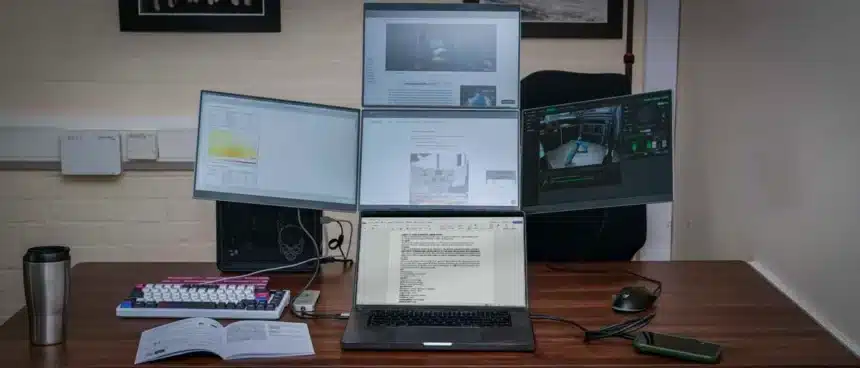
The most practical configuration for daily work involved two landscape panels above the laptop and one on each side, maintaining a low profile while maximizing screen real estate. This setup allows primary applications to remain centered, with secondary applications like email and music on the side panels, and an additional browser window at the top. This constant visibility eliminates the need for constant application switching.
While PC users are accustomed to multi-screen setups, Mac users require the initial USBDisplay app installation. Once installed, the system operates smoothly. A notable feature is the 16:10 aspect ratio, which provides additional vertical screen height for tasks like email, document editing, and spreadsheets, and more horizontal width in portrait mode, aligning perfectly with the system’s productivity focus.
Switching display modes, such as rotating a panel, involves a physical adjustment followed by a selection in the USBDisplay app. The monitors update quickly, and rearranging the display in the OS settings is a straightforward process.
The modular design allows for the use of one, two, three, or all four panels, even on a Mac. Each panel can function as an independent USB display with its own power and data connections, offering flexibility for users who may only need an additional portable monitor.
Performance Benchmarks and Real-World Use
During testing, the portability of these monitors was a standout feature. The supplied backpack, while understated, was perfectly sized to accommodate all four panels, the stand, and even a 16-inch MacBook Pro. The weight was manageable for daily commutes.
Early in the testing period, securely attaching one panel to the stand provided a stable base for various monitor combinations. The stand itself is designed for portability, folding down nearly flat with secure push-button releases for angle adjustment.
The most frequently used configuration involved two landscape panels above the laptop and one on each side, creating a five-screen setup where specific applications were assigned to each display. This allowed for dedicated monitoring of tasks like 3D printing, server status, and media controls, while the main laptop screen remained for core work.
The identical nature of the four monitors simplifies their use, and they closely match the size of the MacBook Pro display. Finding the optimal configuration took some initial experimentation. Locating the necessary USBDisplay software was not immediately straightforward, requiring a search on the official site’s firmware section.
Once installed, the software enables the monitors to activate, ready for orientation adjustments via the USBDisplay app and arrangement within the OS display settings. Out of the box, the calibration is adequate for productivity. For closer matching to a MacBook Pro display, a calibration device is recommended.
Using a Spyder X2 Ultra for calibration and analysis revealed that, despite panel limitations, the monitors achieved high scores for Gamut (5/5) and Contrast (5/5), with a Tone Response of 4.5/5. White Point was lower at 2.5/5 (measured 7200–7500K) before calibration but improved afterwards. Luminance Uniformity also scored 2.5/5, indicating slight brightness variations across panels, though generally imperceptible for most users.
The panels exhibit a slight warm tint before calibration, easily corrected via the OSD. Calibrating all four panels individually takes about an hour but brings them into closer representation with each other and the MacBook Pro screen. While this is not an issue for productivity applications, it’s a consideration for color-sensitive work.
Brightness, a crucial factor for portable displays, was measured at 333.2 nits at 100% (against a claimed 400 nits). At 50-75% brightness in typical ambient light, the panels offer sufficient visibility.
The 1920×1200 resolution, while a limitation compared to higher-resolution displays, is perfectly acceptable for productivity tasks like using Word and Excel. On Windows, the setup process is more streamlined, with the OS handling the display connection automatically after driver installation.
Final Verdict: A Flexible and Portable Workspace Solution
The Lepow 16-inch Quad Monitor system is an excellent choice for those seeking a lightweight, ultra-portable multi-screen solution. Its innovative connection method and adaptable positioning create a sophisticated display option once users find their preferred setup.
These monitors are primarily designed for productivity rather than creative work or gaming. The 1920×1200 resolution at 60Hz and limited color depth may not meet the demands of creative professionals or gamers. However, for augmenting a primary display like a MacBook Pro or an ASUS ProArt monitor, the multi-display system’s utility is undeniable. The ability to use one, two, three, or all four panels independently adds significant flexibility.
Over a month of testing, the system proved invaluable for on-site work, providing ample screen space for documents and media, all conveniently packed into a backpack. While the limited resolution is a drawback, and the panels don’t meet the DCI-P3 or Adobe RGB standards for professional color grading, they are ideal for developers, business users, remote workers, and content creators who require multiple screens for productivity, monitoring, and organization.
The Lepow 16-inch Quad Monitor system offers exceptional value and functionality for its price point, providing a genuinely portable and flexible multi-screen experience for professionals on the move.
Should You Buy the Lepow 16-inch Quad Monitor for Laptop?
- Value: 4/5 – Offers a decent value for a portable quad-screen system, including four 16-inch panels, a stand, and a backpack for approximately $893.
- Design: 4/5 – The composite polymer build is robust and well-suited for portable use, though a step below premium metal constructions.
- Features: 4/5 – Fully modular quad-screen configuration with 16:10 panels, versatile orientation options, and adaptable meeting modes.
- Performance: 3.5/5 – While excellent for productivity, the measured brightness is slightly below claim, and pre-calibration white point and uniformity issues make them unsuitable for color-critical work.
- Overall: 4/5 – A genuinely portable modular quad-screen system offering flexible configurations for any workspace.
Buy it if:
- You work across multiple locations and need a quick-to-set-up, adaptable workspace.
- You require significantly more screen space for managing multiple applications simultaneously.
Don’t buy it if:
- You require professional-grade color accuracy for photo editing or video color grading.
- You are looking for a premium, fixed desk setup; a larger, higher-resolution monitor might be a better fit.